

In this field note
This is the SPF configuration we put in place for DE&TH’s email on deathdiaries.com. We followed a real message from Zoho to Gmail to understand how delivery and sender authorization fit together.
SPF (Sender Policy Framework) lets a domain owner specify which email servers may send using their domain. The receiving email server checks that permission when a message arrives. Rich documented an SPF pass on a message sent from DE&TH through Zoho to Gmail. That result records authorization for the connecting server and the checked domain; it does not establish that the message’s contents are safe.
01 MX is the delivery address
Before a sending server can deliver mail, it needs a destination. An MX query returns mail-server hostnames and their preference values. Smaller preference numbers take priority; additional destinations give the sender alternatives. The hostname then needs an address lookup so the connection can be made over IPv4 or IPv6. These are different jobs, even though both use DNS. RFC 5321 describes the delivery lookup.
Keep a direction arrow in your notes. For a message addressed to Gmail, investigate Gmail’s receiving servers. For mail addressed to your own domain, investigate your domain’s receiving servers. An MX result describes the receiving side of that route; it is not a list of every machine that might send outgoing mail.
dig gmail.com MX +short
dig gmail-smtp-in.l.google.com A +short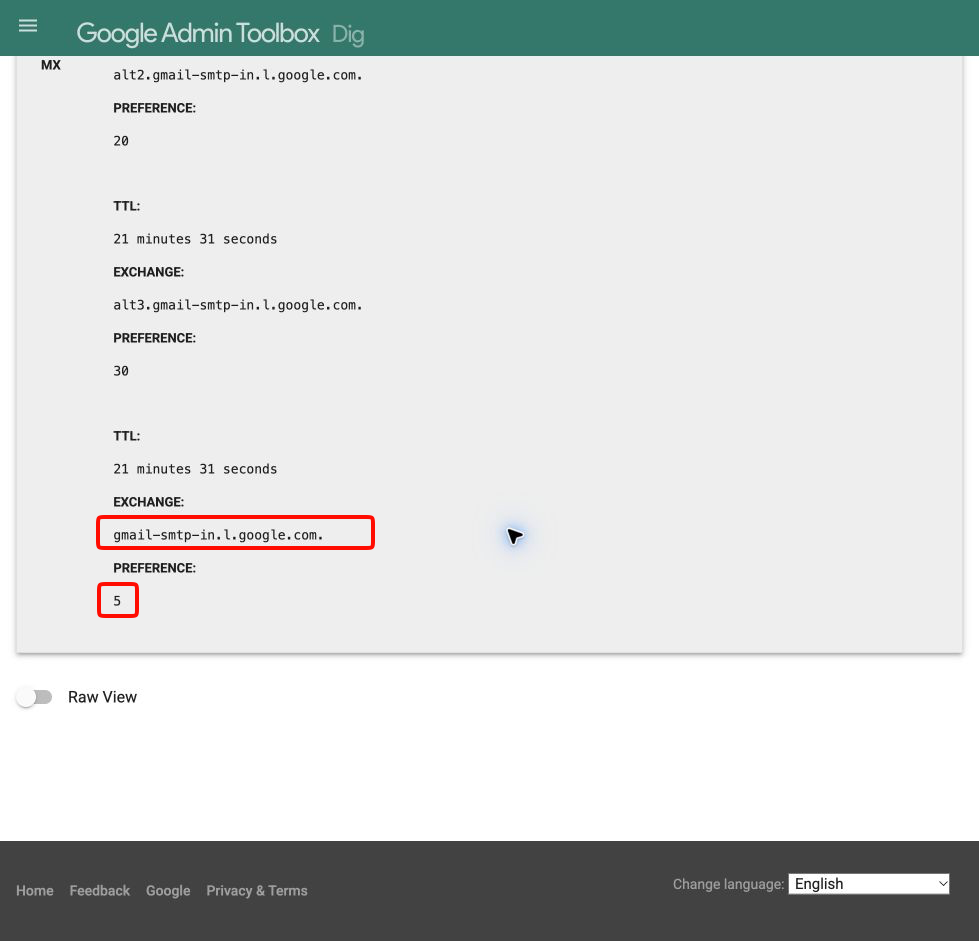
02 Identify what SPF is checking
SPF compares a connecting server’s IP address with a policy for an SMTP identity. This walkthrough uses MAIL FROM, the envelope sender. That identity can differ from the visible From: header. SPF can also check the HELO identity; these are separate checks. RFC 7208 defines both.
For the message Rich checked, Gmail received the connection from 165.173.180.55. The envelope domain was deathdiaries.com. Those are the inputs to follow—not the IP of the laptop used to compose the message.
- Connecting server
165.173.180.55- Envelope domain
deathdiaries.com

Permission is another.
03 Read the policy, one term at a time
The SPF policy lives in a DNS TXT record. The delivered email’s headers hold the receiving email server’s recorded result, such as spf=pass or Received-SPF: pass. The policy and the recorded result are separate pieces of the setup.
We published our TXT record through Spaceship, which manages the domain’s DNS. In Zoho, we checked its status under Admin Console → Domains → deathdiaries.com → Email Configuration → SPF.
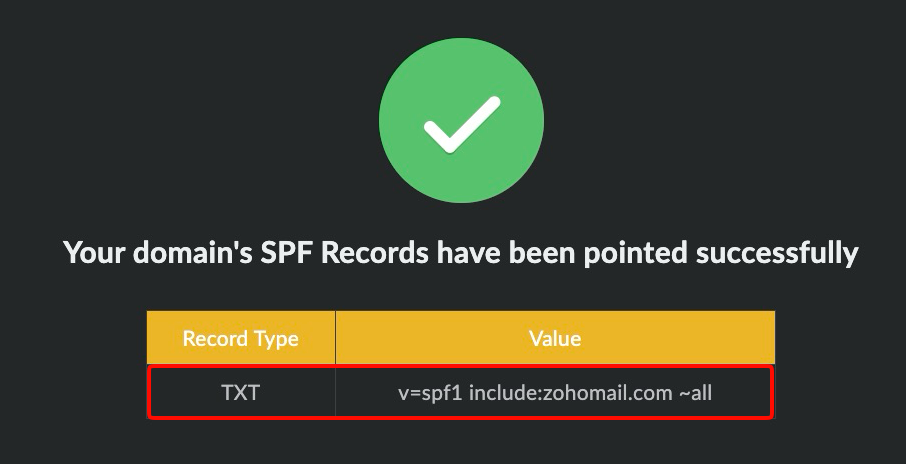
Spaceship is where we published the record; Zoho displays its configuration status. A receiving email server retrieves the policy through DNS to perform the SPF check. Here is the lookup for our domain:
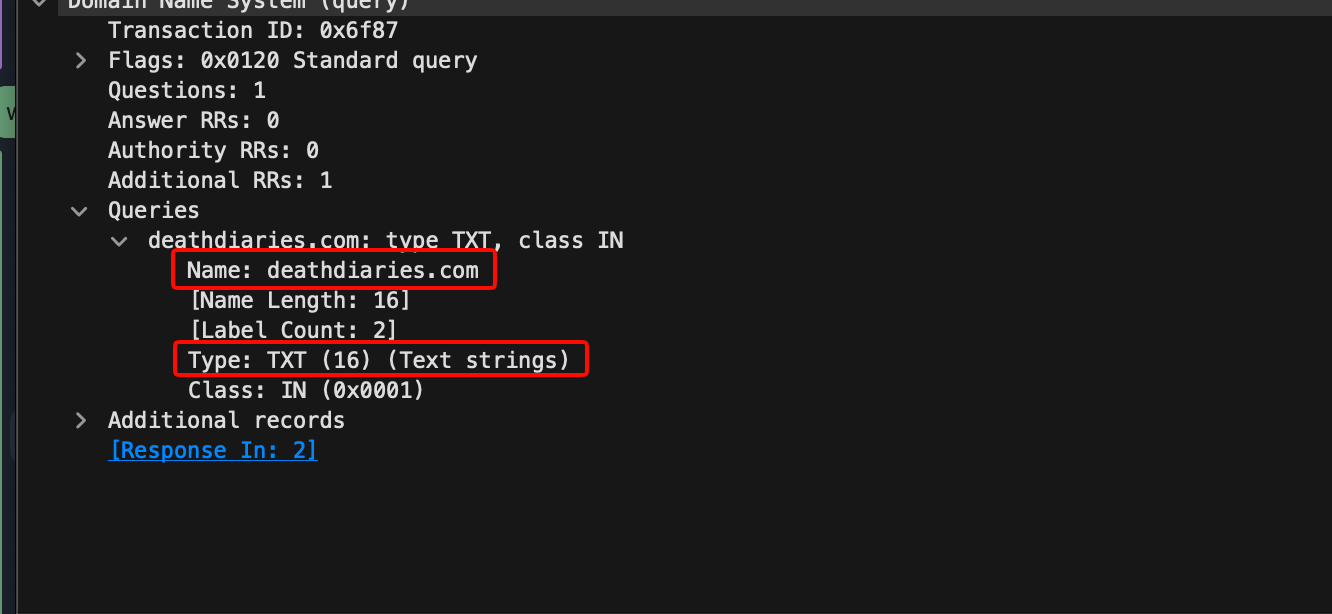
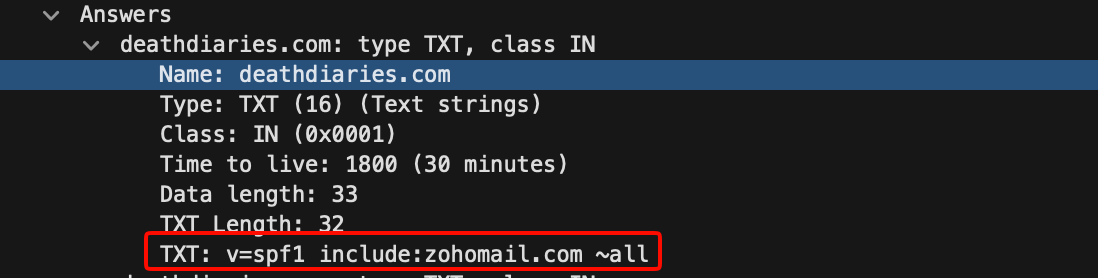
dig deathdiaries.com TXT +short

v=spf1 include:zohomail.com ~all
This is the SPF policy recorded for DE&TH’s email setup. A domain can have unrelated TXT records too; the SPF entry starts with v=spf1. Publish one SPF policy at a given name and combine the services that send for that domain within it. A mailbox provider, contact form and newsletter may use different infrastructure. Zoho’s configuration guidance explains how to include those senders.
04 Follow the authorization trail
Our domain’s policy led from deathdiaries.com to zohomail.com, then spf.zohomail.com. The relevant range was 165.173.180.0/24; the observed IP 165.173.180.55 was inside it.
dig zohomail.com TXT +short
dig spf.zohomail.com TXT +short

165.173.180.55 ∈ 165.173.180.0/24
An include evaluates another policy against the same IP. An included pass matches. An included fail does not automatically make the outer policy fail; evaluation continues. If this outer policy reaches ~all, it returns softfail. DNS and policy errors can instead end evaluation with an error. The standard also limits DNS-querying terms to ten during evaluation. Read the include semantics before treating an include as a simple text substitution.
One IP. Three policies.
Our actual email setup, step by step. This trace shows the recorded DNS results; it does not query live DNS.
Our TXT policy asks SPF to evaluate Zoho’s policy against the connecting IP, 165.173.180.55.
The same IP is checked throughout. The receiving email server still makes its own delivery decision.
05 Separate a reproduced lookup from a recorded result
The three local TXT lookups produced six packets in Enleak’s capture: three requests and three replies. They reproduce the DNS trail. They are not a capture of Gmail’s internal processing.
For an investigation, keep two artifacts distinct: what your lookup returned, and what the receiving system reported for the delivered message. An Authentication-Results header is the receiving email server’s report of authentication checks. Its presence alone is not enough to trust it: the reporting system and the trust boundary matter. A forged result arriving from outside that boundary must not be accepted as your own infrastructure’s conclusion. RFC 8601 explains this trust boundary.
A practical notebook can therefore record the message identifier, receipt time, reporting mail system, checked identity, connecting IP and result, alongside separately timestamped DNS observations. This is a suggested way to keep the reasoning inspectable; it is not a claim that a DNS lookup independently proves the contents of a historical message.
A sender can be authorized.
The message still needs a closer look.
06 A pass is useful. It is not the whole review.
Authentication is one layer of email handling. Gmail’s sender guidance covers SPF, DKIM and DMARC alongside transport security, DNS configuration and message practices. It recommends using all three authentication methods; bulk senders have additional requirements. Successful authentication does not remove the need to review the content or the recipient’s context. Google’s current sender guidelines are a useful next stop when maintaining a domain’s email configuration.
For DE&TH, the next step is to inventory every service that sends mail for the domain and test representative messages from each one. Keep the result attached to the sender and the checked domain. If a new contact form or campaign tool appears later, that inventory gives you somewhere concrete to start reviewing its configuration.
These records and screenshots document the setup described here. Provider DNS records can change.